
robertdebock.awx
ARCHIVED - awx
NOTA BENE: This repository has been archived, no maintenance is being performed anymore.
Install and configure AWX on your system.
| Travis | GitHub | Quality | Downloads |
|---|---|---|---|
 |
 |
 |
 |
Example Playbook
This example is taken from molecule/resources/converge.yml and is tested on each push, pull request and release.
---
- name: Converge
  hosts: all
  become: yes
  gather_facts: yes

  roles:
    - robertdebock.awx
The machine may need to be prepared using molecule/resources/prepare.yml:
---
- name: Prepare
  hosts: all
  gather_facts: no
  become: yes

  roles:
    - role: robertdebock.bootstrap
    - role: robertdebock.core_dependencies
    - role: robertdebock.epel
    - role: robertdebock.buildtools
    - role: robertdebock.python_pip
    - role: robertdebock.docker
    - role: robertdebock.ansible
For verification molecule/resources/verify.yml run after the role has been applied.
---
- name: Verify
  hosts: all
  become: yes
  gather_facts: yes

  tasks:
    - name: check if connection still works
      ping:
Also see a full explanation and example on how to use these roles.
Role Variables
These variables are set in defaults/main.yml:
---
# defaults file for awx

# The default password for the user `admin`.
awx_admin_password: password

# The location where PostgreSQL should store its data.
awx_postgres_data_dir: /var/lib/pgdata
awx_postgres_database:
  database: awx
  username: awx
  password: awxpass
  port: 5432

# AWX uses a secret key to encrypt data. This value should be stored in vault.
awx_secret_key: awxsecret

# The ports AWX should listen to.
awx_http_port: 80
awx_https_port: 443

# Details for rabbitmq
awx_rabbitmq_password: awxpass
awx_rabbitmq_erlang_cookie: cookiemonster

# When using the API, should the SSL be verified?
awx_tower_verify_ssl: no

# You can populate AWX using this structure.
# awx_organizations:
#  - name: demo
#    description: Demo organization
#    users:
#      - name: demo
#        password: demo
#        email: [email protected]
#        first_name: De
#        last_name: Mo
#        superuser: true
#    teams:
#      - name: demo
#        description: Demo team
#    credentials:
#      - name: demo_ssh
#        description: demo ssh credentials
#        kind: ssh
#        username: demo
#        password: demo
#      - name: demo_scm
#        description: demo scm credentials
#        kind: scm
#        username: Null
#        password: Null
#    projects:
#      - name: demo
#        description: demo project
#        scm_credential: demo_scm
#        scm_type: git
#        scm_url: "https://github.com/robertdebock/ansible"
#    inventories:
#      - name: demo
#        description: demo inventory
#    job_templates:
#      - name: demo
#        description: demo_job_template
#        project: demo
#        playbook: ping.yml
#        inventory: demo
#        credential: demo_ssh
#        job_type: run
Requirements
- Access to a repository containing packages, likely on the internet.
- A recent version of Ansible. (Tests run on the current, previous and next release of Ansible.)
The following roles can be installed to ensure all requirements are met, using ansible-galaxy install -r requirements.yml:
---
- robertdebock.ansible
- robertdebock.bootstrap
- robertdebock.buildtools
- robertdebock.core_dependencies
- robertdebock.docker
- robertdebock.epel
- robertdebock.python_pip
Context
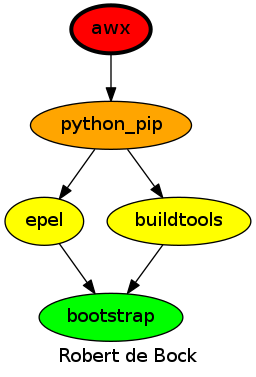
This role is a part of many compatible roles. Have a look at the documentation of these roles for further information.
Here is an overview of related roles:
Compatibility
This role has been tested on these container images:
| container | tags |
|---|---|
| amazon | all |
| debian | all |
| el | 8 |
| fedora | all |
| opensuse | all |
| ubuntu | bionic |
The minimum version of Ansible required is 2.8 but tests have been done to:
- The previous version, on version lower.
- The current version.
- The development version.
Exceptions
Some variarations of the build matrix do not work. These are the variations and reasons why the build won't work:
| variation | reason |
|---|---|
| Alpine | Python.h: No such file or directory |
| Ubuntu | Unable to find any of pip2, pip to use. pip needs to be installed. |
Testing
Unit tests are done on every commit, pull request, release and periodically.
If you find issues, please register them in GitHub
Testing is done using Tox and Molecule:
Tox tests multiple ansible versions. Molecule tests multiple distributions.
To test using the defaults (any installed ansible version, namespace: robertdebock, image: fedora, tag: latest):
molecule test

# Or select a specific image:
image=ubuntu molecule test
# Or select a specific image and a specific tag:
image="debian" tag="stable" tox
Or you can test multiple versions of Ansible, and select images:
Tox allows multiple versions of Ansible to be tested. To run the default (namespace: robertdebock, image: fedora, tag: latest) tests:
tox

# To run CentOS (namespace: `robertdebock`, tag: `latest`)
image="centos" tox
# Or customize more:
image="debian" tag="stable" tox
License
Apache-2.0
Author Information
ansible-galaxy install robertdebock.awx