
buluma.consul
Ansible role consul
Install and configure consul on your system.
| GitHub | Version | Issues | Pull Requests | Downloads |
|---|---|---|---|---|
 |
 |
 |
 |
 |
Example Playbook
This example is taken from molecule/default/converge.yml and is tested on each push, pull request and release.
---
- name: Converge
  hosts: all
  become: true
  gather_facts: false

  roles:
    - role: buluma.consul
      consul_bootstrap_expect: 1
      consul_encrypt: "6r73CP0icJrap1tsQ17yuqzVguho4/yz+aI/dkVg2Kk="
      consul_bind_addr: "0.0.0.0"
      consul_services:
        - name: web
          tags:
            - rails
          port: 80
The machine needs to be prepared. In CI this is done using molecule/default/prepare.yml:
---
- name: Prepare
  hosts: all
  become: true
  gather_facts: false

  roles:
    - role: buluma.bootstrap
    - role: buluma.core_dependencies
    - role: buluma.hashicorp
Also see a full explanation and example on how to use these roles.
Role Variables
The default values for the variables are set in defaults/main.yml:
---
# defaults file for consul

# You can install consul using a package in this role. If you have installed
# consul manually, set this to `false`.
consul_install_package: true

# Consul requires a license. Without setting a license (or an empty license), some steps are skipped.
consul_license: ""

# This flag controls the datacenter in which the agent is running.
consul_datacenter: my-dc-1

# This flag provides a data directory for the agent to store state.
consul_data_dir: /opt/consul

# The address to which Consul will bind client interfaces, including the HTTP and DNS servers
consul_client_addr: "0.0.0.0"

# Enables the built-in web UI server and the required HTTP routes.
consul_ui: true

# This flag is used to control if an agent is in server or client mode.
consul_server: true

# This flag provides the number of expected servers in the datacenter.
# consul_bootstrap_expect: 3

# Specifies the secret key to use for encryption of Consul network traffic.
# consul_encrypt: "6r73CP0icJrap1tsQ17yuqzVguho4/yz+aI/dkVg2Kk="

# Similar to -join but allows retrying a join until it is successful.
# consul_retry_join:
#   - consul.domain.internal

# The address that should be bound to for internal cluster communications.
# consul_bind_addr: "{{ ansible_default_ipv4.address }}"

# The advertise address is used to change the address that we advertise to other nodes in the cluster.
# consul_advertise_addr: "{{ ansible_default_ipv4.address }}"

# You can define service that Consul should manage.
# consul_services:
#   - name: web
#     tags:
#       - rails
#     port: 80

# In same cases you may not want to start Consul as a service, because you are "bootstrapping" for example.
consule_service_started_and_enabled: true
Requirements
- pip packages listed in requirements.txt.
State of used roles
The following roles are used to prepare a system. You can prepare your system in another way.
| Requirement | GitHub | Version |
|---|---|---|
| buluma.bootstrap |  |
 |
| buluma.core_dependencies |  |
 |
| buluma.hashicorp |  |
 |
Context
This role is a part of many compatible roles. Have a look at the documentation of these roles for further information.
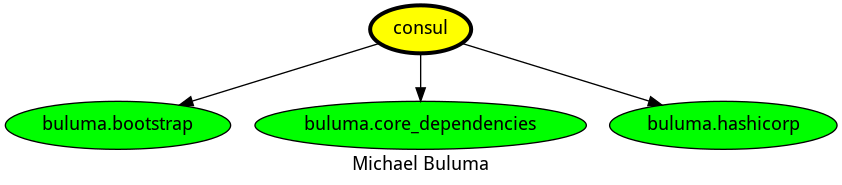
Here is an overview of related roles:
Compatibility
This role has been tested on these container images:
| container | tags |
|---|---|
| Amazon | Candidate |
| Debian | bullseye |
| EL | all |
| Fedora | 37, 38 |
| Ubuntu | all |
The minimum version of Ansible required is 2.12, tests have been done to:
- The previous version.
- The current version.
- The development version.
If you find issues, please register them in GitHub
Changelog
License
Author Information
ansible-galaxy install buluma.consul