
buluma.sonarqube
Ansible role sonarqube
An Ansible Role that install SonarQube.
| GitHub | Version | Issues | Pull Requests | Downloads |
|---|---|---|---|---|
 |
 |
 |
 |
 |
Example Playbook
This example is taken from molecule/default/converge.yml and is tested on each push, pull request and release.
---
- name: Converge
  hosts: all
  vars:
    sonar_version: 7.9.6
    sonar_web_host: 127.0.0.1
    sonar_plugins:
      - name: "sonar-l10n-pt"
        version: "6.4"
        commercial: false
        url: "https://github.com/felipebz/sonar-l10n-pt/releases/download/v6.4/sonar-l10n-pt-plugin-6.4.jar"
      - name: "sonar-html-plugin"
        version: "3.2.0.2082"
        commercial: false
      - name: "ansible"
        version: "2.5.1"
        marketplace: true
      - name: "ha"
        version: "7.1"
        marketplace: true
      - name: "ha"
        version: "7.1"
        marketplace: true
      - name: "authgithub"
        version: "1.5"
        marketplace: true
      - name: "authgitlab"
        version: "1.3.2"
        marketplace: true
      - name: "authgoogleoauth"
        version: "1.6.1"
        marketplace: true
  # pre_tasks:
  #   # TODO: Prepare Java 11
  #   - name: install openjdk (redhat)
  #     ansible.builtin.package:
  #       name: java-11-openjdk
  #       state: present
  #     when: ansible_facts['os_family'] == "RedHat"
  #   - name: add backports repository
  #     ansible.builtin.apt_repository:
  #       repo: deb http://ftp.debian.org/debian stretch-backports main
  #       state: present
  #       update_cache: yes
  #     when: ansible_facts['os_family'] == "Debian"
  #   - name: install openjdk (debian)
  #     ansible.builtin.apt:
  #       name: openjdk-11-jdk
  #       state: present
  #     when: ansible_facts['os_family'] == "Debian"
  roles:
    - role: buluma.sonarqube
The machine needs to be prepared. In CI this is done using molecule/default/prepare.yml:
---
- name: Prepare
  hosts: all

  roles:
    - role: buluma.bootstrap
    - role: buluma.epel
    - role: buluma.java
      java_vendor: openjdk
      java_type: jdk
      java_version: "11"

  tasks:
    - name: "Ensure apt cache is up to date"
      ansible.builtin.apt:
        update_cache: yes
      when: ansible_distribution == 'Ubuntu'

    - name: "Install package dependencies"
      ansible.builtin.package:
        name: "{{ item }}"
        state: "present"
      with_items:
        - unzip
Also see a full explanation and example on how to use these roles.
Role Variables
The default values for the variables are set in defaults/main.yml:
---
# defaults file for ansible-role-sonarqube/

# SonarQube Install directory
sonar_install_directory: /opt/sonarqube

# SonarQube base directory
sonar_base_dir: "{{ sonar_install_directory }}/sonarqube-{{ sonar_version }}"

# SonarQube daemon directory
sonar_daemon_dir: "{{ sonar_base_dir }}/bin/linux-x86-{{ ansible_userspace_bits }}"

# SonarQube conf directory
sonar_conf_dir: "{{ sonar_base_dir }}/conf"

sonar_logs_dir: "/var/log/sonarqube"

# Paths to persistent data files (embedded database and search index)
sonar_data_dir: "{{ sonar_base_dir }}/data"

# Paths to temporary files
sonar_temp_dir: "{{ sonar_base_dir }}/temp"

# SonarQube version to install
sonar_version: 7.3

# SonarQube system group
sonar_group: sonar

# SonarQube system user
sonar_user: sonar

# SonarQube service LimitNOFILE parameter
sonar_limitnofile: 65536

# SonarQube plugins to install
sonar_plugins: []
# - { name: "plugin name", version: "1.0", commercial: false, url: 'optional'}

# Use the embedded H2 database, not for production environmnet
sonar_db_embedded: true
sonar_db_embedded_port: 9092

# SonarQube JDBC Credentials
sonar_db_user: ""
sonar_db_pass: ""

# SonarQube JDBC URL
# examples (from default sonar.properties file):
# ----- MySQL 5.6 or greater
# Only InnoDB storage engine is supported (not myISAM).
# Only the bundled driver is supported. It can not be changed.
# sonar_jdbc_url=jdbc:mysql://localhost:3306/sonar?useUnicode=true&characterEncoding=utf8&rewriteBatchedStatements=true&useConfigs=maxPerformance
# ----- Oracle 11g/12c
# - Only thin client is supported
# - Only versions 11.2.x and 12.x of Oracle JDBC driver are supported
# - The JDBC driver must be copied into the directory extensions/jdbc-driver/oracle/
# - If you need to set the schema, please refer to http://jira.sonarsource.com/browse/SONAR-5000
# sonar_jdbc_url=jdbc:oracle:thin:@localhost:1521/XE
# ----- PostgreSQL 8.x/9.x
# If you don't use the schema named "public", please refer to http://jira.sonarsource.com/browse/SONAR-5000
# sonar_jdbc_url=jdbc:postgresql://localhost/sonar

# ----- Microsoft SQLServer 2008/2012/2014 and SQL Azure
# A database named sonar must exist and its collation must be case-sensitive (CS) and accent-sensitive (AS)
# Use the following connection string if you want to use integrated security with Microsoft Sql Server
# Do not set sonar.jdbc.username or sonar.jdbc.password property if you are using Integrated Security
# For Integrated Security to work, you have to download the Microsoft SQL JDBC driver package from
# http://www.microsoft.com/en-us/download/details.aspx?displaylang=en&id=11774
# and copy sqljdbc_auth.dll to your path. You have to copy the 32 bit or 64 bit version of the dll
# depending upon the architecture of your server machine.
# This version of SonarQube has been tested with Microsoft SQL JDBC version 4.1
# sonar_jdbc_url=jdbc:sqlserver://localhost;databaseName=sonar;integratedSecurity=true
# Use the following connection string if you want to use SQL Auth while connecting to MS Sql Server.
# Set the sonar.jdbc.username and sonar.jdbc.password appropriately.
# sonar_jdbc_url=jdbc:sqlserver://localhost;databaseName=sonar

sonar_jdbc_url: ""

# SonarQube JDBC maximum number of active connection
sonar_jdbc_maxactive: 60

# The maximum number of connections that can remain idle in the
# pool, without extra ones being released, or negative for no limit.
sonar_jdbc_maxidle: 5

# The minimum number of connections that can remain idle in the pool,
# without extra ones being created, or zero to create none.
sonar_jdbc_minidle: 2


# The maximum number of milliseconds that the pool will wait (when there
# are no available connections) for a connection to be returned before
# throwing an exception, or <= 0 to wait indefinitely.
sonar_jdbc_maxwait: 5000

sonar_jdbc_min_evictable_idle_time_millis: 600000
sonar_jdbc_time_between_eviction_runs_millis: 30000


# SonarQube Web Server configuration
# sonar_web_java_opts: "-Xmx512m -Xms128m -XX:+HeapDumpOnOutOfMemoryError -Djava.net.preferIPv4Stack=true"
sonar_web_java_opts: ""

# Same as previous property, but allows to not repeat all other settings like -Xmx
sonar_web_java_additional_opts: ""

# Binding IP address. For servers with more than one IP address, this property specifies which
# address will be used for listening on the specified ports.
# By default, ports will be used on all IP addresses associated with the server.
sonar_web_host: 0.0.0.0

# Web context. When set, it must start with forward slash (for example /sonarqube).
# The default value is root context (empty value).
sonar_web_context: ""

# TCP port for incoming HTTP connections. Default value is 9000.
sonar_web_port: 9000

# The maximum number of connections that the server will accept and process at any given time.
# When this number has been reached, the server will not accept any more connections until
# the number of connections falls below this value. The operating system may still accept connections
# based on the sonar.web.connections.acceptCount property. The default value is 50.
sonar_web_http_max_threads: 50

# The minimum number of threads always kept running. The default value is 5.
sonar_web_http_min_threads: 5

# The maximum queue length for incoming connection requests when all possible request processing
# threads are in use. Any requests received when the queue is full will be refused.
# The default value is 25.
sonar_web_http_accept_count: 25

# TCP port for incoming AJP connections. Disabled if value is -1. Disabled by default.
sonar_ajp_port: -1

# --------------------------------------------------------------------------------------------------
# COMPUTE ENGINE
# The Compute Engine is responsible for processing background tasks.
# Compute Engine is executed in a dedicated Java process. Default heap size is 512Mb.
# Use the following property to customize JVM options.
#    Recommendations:
#
#    The HotSpot Server VM is recommended. The property -server should be added if server mode
#    is not enabled by default on your environment:
#    http://docs.oracle.com/javase/8/docs/technotes/guides/vm/server-class.html
#
# sonar_ce_java_opts: "-Xmx512m -Xms128m -XX:+HeapDumpOnOutOfMemoryError -Djava.net.preferIPv4Stack=true"
sonar_ce_java_opts: ""

# Same as previous property, but allows to not repeat all other settings like -Xmx
sonar_ce_java_additional_opts: ""

# The number of workers in the Compute Engine. Value must be greater than zero.
# By default the Compute Engine uses a single worker and therefore processes tasks one at a time.
#    Recommendations:
#
#    Using N workers will require N times as much Heap memory (see property
#    sonar.ce.javaOpts to tune heap) and produce N times as much IOs on disk, database and
#    Elasticsearch. The number of workers must suit your environment.
sonar_ce_worker_count: 1

# --------------------------------------------------------------------------------------------------
# ELASTICSEARCH
# Elasticsearch is used to facilitate fast and accurate information retrieval.
# It is executed in a dedicated Java process. Default heap size is 1Gb.

# JVM options of Elasticsearch process
#    Recommendations:
#
#    Use HotSpot Server VM. The property -server should be added if server mode
#    is not enabled by default on your environment:
#    http://docs.oracle.com/javase/8/docs/technotes/guides/vm/server-class.html
#
# sonar_search_java_opts: "-Xmx1G -Xms1G -Xss256k -Djava.net.preferIPv4Stack=true -XX:CMSInitiatingOccupancyFraction=75 -XX:+UseCMSInitiatingOccupancyOnly -XX:+HeapDumpOnOutOfMemoryError"
sonar_search_java_opts: ""

# Same as previous property, but allows to not repeat all other settings like -Xmx
sonar_search_java_additional_opts: ""

# Elasticsearch port. Default is 9001. Use 0 to get a free port.
# As a security precaution, should be blocked by a firewall and not exposed to the Internet.
sonar_search_port: 9001

# Elasticsearch host. The search server will bind this address and the search client will connect to it.
# Default is 127.0.0.1.
# As a security precaution, should NOT be set to a publicly available address.
sonar_search_host: 127.0.0.1


# --------------------------------------------------------------------------------------------------
# UPDATE CENTER

# Update Center requires an internet connection to request https://update.sonarsource.org
# It is enabled by default.
sonar_updatecenter_activate: true

# HTTP proxy (default none)
http_proxy_host: ""
http_proxy_port: ""
# HTTPS proxy (defaults are values of http.proxyHost and http.proxyPort)
https_proxy_host: ""
https_proxy_port: ""

# NT domain name if NTLM proxy is used
http_auth_ntlm_domain: ""

# SOCKS proxy (default none)
socks_proxy_host: ""
socks_proxy_port: ""

# Proxy authentication (used for HTTP, HTTPS and SOCKS proxies)
http_proxy_user: ""
http_proxy_password: ""

# --------------------------------------------------------------------------------------------------
# LOGGING

# Level of logs. Supported values are INFO(default), DEBUG and TRACE (DEBUG + SQL + ES requests)
sonar_log_level: "INFO"

# Rolling policy of log files
#    - based on time if value starts with "time:", for example by day ("time:yyyy-MM-dd")
#      or by month ("time:yyyy-MM")
#    - based on size if value starts with "size:", for example "size:10MB"
#    - disabled if value is "none".  That needs logs to be managed by an external system like logrotate.
sonar_log_rolling_policy: "time:yyyy-MM-dd"

# Maximum number of files to keep if a rolling policy is enabled.
#    - maximum value is 20 on size rolling policy
#    - unlimited on time rolling policy. Set to zero to disable old file purging.
sonar_log_max_files: 7

# Access log is the list of all the HTTP requests received by server. If enabled, it is stored
# in the file {sonar.path.logs}/access.log. This file follows the same rolling policy as for
# sonar.log (see sonar.log.rollingPolicy and sonar.log.maxFiles).
sonar_web_access_logs_enable: true

# Format of access log. It is ignored if sonar.web.accessLogs.enable=false. Possible values are:
#    - "common" is the Common Log Format, shortcut to: %h %l %u %user %date "%r" %s %b
#    - "combined" is another format widely recognized, shortcut to: %h %l %u [%t] "%r" %s %b "%i{Referer}" "%i{User-Agent}"
#    - else a custom pattern. See http://logback.qos.ch/manual/layouts.html#AccessPatternLayout.
# If SonarQube is behind a reverse proxy, then the following value allows to display the correct remote IP address:
sonar_web_access_logs_pattern: "%i{X-Forwarded-For} %l %u [%t] \"%r\" %s %b \"%i{Referer}\" \"%i{User-Agent}\""

# --------------------------------------------------------------------------------------------------
# LDAP
# Ldap configuration for ldap auth plugin
# see https://docs.sonarqube.org/latest/instance-administration/delegated-auth/ for more details and description of properties
#
# Example:
# sonar_ldap:
#     authenticator_downcase: false
#     url: 'ldap://your_ldap_url'
#     bind_dn: 'cn=sonaruser,o=example,o=com'
#     bind_password: 'MyBindPassword'
#     user_base_dn: 'o=users,o=example,o=com'
#     authentication: simple
#     realm: 'example.org'
#     context_factory_class: com.sun.jndi.ldap.LdapCtxFactory
#     start_tls: false
#     follow_referrals: true
#     user_base_dn: 'cn=users,dc=example,dc=org'
#     user_request: '(&(objectClass=inetOrgPerson)(uid={login}))'
#     user_real_name_attribute: 'cn'
#     user_email_attribute: 'mail'
#     group_base_dn: 'o=groups,o=example,o=com'
#     group_request: '(&(objectClass=groupOfNames)(member={dn}))'
#     group_id_attribute: 'sAMAccountName'
#
# default: undefined
# sonar_ldap:

# --------------------------------------------------------------------------------------------------
# OTHERS

# Delay in seconds between processing of notification queue. Default is 60 seconds.
sonar_notifications_delay: 60

# Pass any custom Java properties to sonar.properties
sonar_additional_properties: {}

# --------------------------------------------------------------------------------------------------
# DEVELOPMENT - only for developers
# The following properties MUST NOT be used in production environments.

# Dev mode allows to reload web sources on changes and to restart server when new versions
# of plugins are deployed.
sonar_web_dev: false

# Path to webapp sources for hot-reloading of Ruby on Rails, JS and CSS (only core,
# plugins not supported).
sonar_web_dev_sources: ""

# Elasticsearch HTTP connector, for example for KOPF:
# http://lmenezes.com/elasticsearch-kopf/?location=http://localhost:9010
sonar_search_http_port: -1
Requirements
- pip packages listed in requirements.txt.
State of used roles
The following roles are used to prepare a system. You can prepare your system in another way.
| Requirement | GitHub | Version |
|---|---|---|
| buluma.bootstrap |  |
 |
| buluma.epel |  |
 |
| buluma.java |  |
 |
| buluma.service |  |
 |
Context
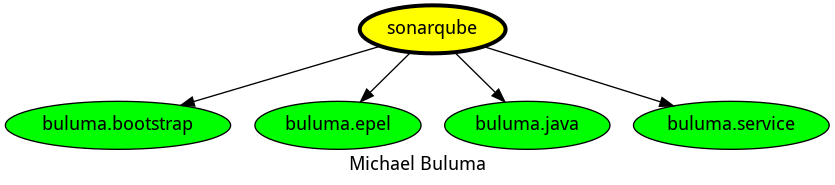
This role is a part of many compatible roles. Have a look at the documentation of these roles for further information.
Here is an overview of related roles:
Compatibility
This role has been tested on these container images:
| container | tags |
|---|---|
| EL | 7, 8 |
| Ubuntu | all |
| Debian | all |
The minimum version of Ansible required is 2.12, tests have been done to:
- The previous version.
- The current version.
- The development version.
If you find issues, please register them in GitHub
Changelog
License
Author Information
ansible-galaxy install buluma.sonarqube